Your Sparkuna Guide
How Sparkuna works, step by step. Choose a topic, look at the picture and read the steps. Press 🔊 Listen to hear a topic.
Learn how Sparkuna works. Tap 🔊 Listen to hear it. A grown-up can read it with you too.
🚀 Start here: a good day on Sparkuna
About 10 minutes a day is enough. Do these four things:
Look at My next steps. It shows what to do first.
Tap a big picture under What shall we do today?
Take your time on every question.
5 questions. Everyone in your grade gets the same ones.
Put it anywhere on My Island.
Come back tomorrow. Every day you earn points, your 🔥 streak goes up by 1.
⭐ The golden rules
🧭 What do you want to know?
Tap a picture to jump to it.
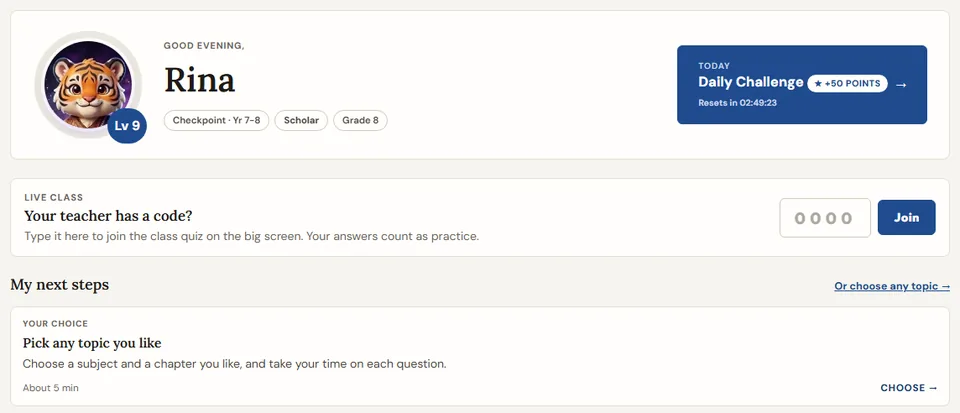
🏠 Your home page
This is the first page you see. Tap 🏠 Home in the top bar to come back to it.
- 🏠This is your home page. Tap Home to come back.
- ✨Tap Start on Today's path.
- 👆Tap a big picture to start.
- ✅Do your 3 quests.
- 🎁Then open your chest!
- 🧩Comics, puzzles and clubs are in More at the bottom.
- ✨ Today's path: one Start button for today. It takes you through 2 or 3 short steps, one after another, and ends with a treat: a game, a puzzle or a simulation. Choose your goal for today: 1, 2 or 3 steps.
- My next steps shows up to 3 things to do, and why. Your teacher's chapter comes first.
- A Quick check card asks 5 new questions on a topic from a few days ago: one that was tricky, one you did well on, or one you did with a hint or with your class. It shows whether it has stuck.
- Today's Quests are 3 small missions. Finish one and the daily chest opens. Finish all three for the gold chest.
- A message from your teacher shows here too.
- A code on your teacher's big screen? Type it in the Live class box at the top of your home page.
- Looking for something? Type it in the search box under your name: see Find and save.
- Chests never give points. They give things for your companion, like a hat or a streak freeze.
- A new pantun, a short Indonesian rhyme, waits on the Reading page every day. Tap What does it mean? to read its message in English.
- The exam map card opens a map of your Cambridge exam topics.
- Everything else is in More at the bottom: one tile for each page that is not in the top bar. A tile with news has a short line, like your place in the league, and an orange dot when there is something to do there. When missed questions are ready to win back, a Rematch tile shows up. An orange dot on My Island in the top bar means something is waiting on your island.
- Need help on a page? Tap ❓ How does this page work? It is on the page, and in the menu under your picture.
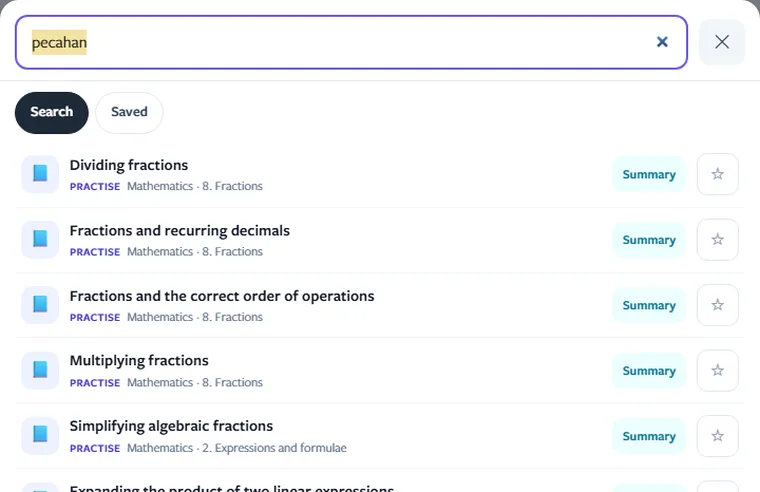
🔎 Find and save
Find any topic, simulation, game or page for your grade, and keep the ones you want for later.
- 🔎Tap your picture. Then tap Search.
- ⭐Tap the star to keep it.
- Type in the search box next to More on your home page, or tapTap your picture (top right), then 🔎 Search. On a keyboard, press /.
- Type a topic or a word from your lesson, like fractions or circuits. A word in Bahasa Indonesia works too, like pecahan or listrik.
- Tap a result to open it. A topic opens Practice with that chapter and topic ready. 📄 Summary opens its page to read or print.
- Tap ☆ to save a result. Find it again under ⭐ Saved, in the same window or in the menu under your picture.
- Search shows what is for your grade only.
- In Sim Lab, ☆ Save under a simulation keeps it too.
- Nothing found? Try a shorter word, or the word your book uses.
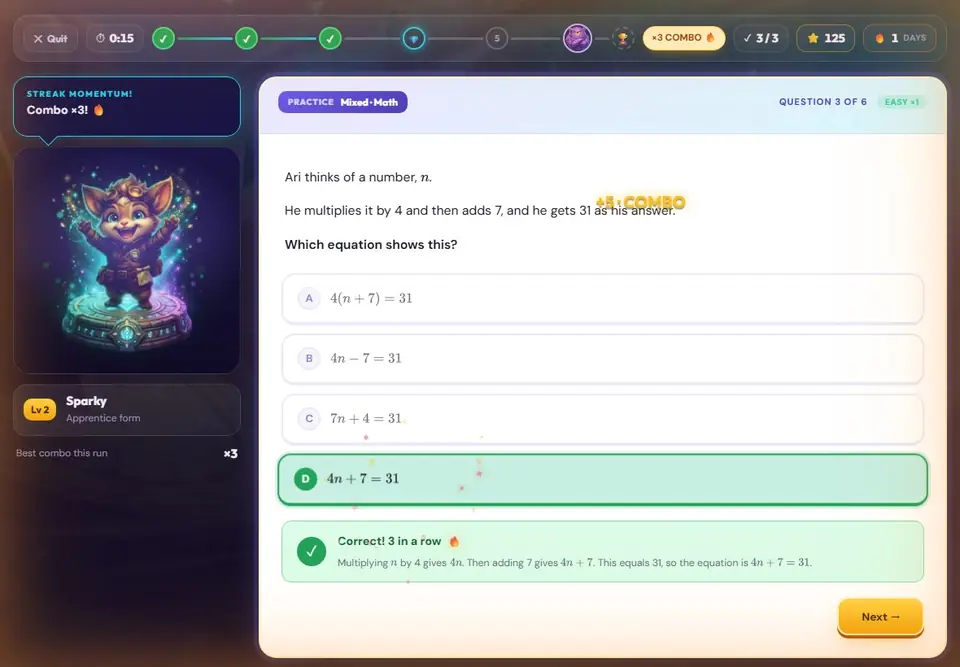
✏️ Practice
Answer questions made for your grade. This is the main way to earn points.
- ✏️Tap Practice.
- 🔊Listen to the question.
- 👆Tap your answer.
- ⭐Right answers give points.
- 🔤Try English too: words and questions.
- 🌼Right answers grow your flower.
- Tap Practice.
- Choose a subject, a chapter and a level: Any, Easy, Medium or Hard. Not sure? Choose Any.
- Choose a subject. Then pick a topic, or just press start.
- Press start. A run has 5 or more questions. The last one is the boss: a little harder.
- Get 3 right in a row for a combo. At the end you see your points.
- You practise Maths, English and Science. 🔊 Every question can be read to you, in a clear recorded voice.
- 🔤 English has four parts: words, questions, little words and sentences. Some questions show a picture first.
- Every right answer adds a petal to your flower 🌼 (or a colour to your rainbow 🌈). A wrong answer never takes one away.
- You practise Maths, Science and English. Your first English run is a short test. It finds your English level.
- 📇 Word Cards help you learn English words at your level. Find a Word of the day and a few cards every day on the Word Cards page: tap I know it and answer a short question, or Show me. Cards you know come back later, the others come back tomorrow. No points: it is practice for you.
- 🧩 Cover it is a maths puzzle for your grade: find it in the Maths box on this page. Cover the whole grid with the pieces. The numbers under each piece must add up to the number on the piece (or multiply to it, when the puzzle says so). Tap a piece, then tap a square, or drag it there. ↻ Turn turns it, 💡 Hint puts one piece in place. There can be more than one right answer. No points: it is practice for you.
- Is a chapter hard? Choose Warm-up when you see it. These short questions are the small steps the chapter needs. Each right answer gives 3 points.
- Your first 20 runs each day get full points. After that, careful runs get fewer points.
- Stuck before you answer? Some questions have 💡 Need a hint? It shows the first step or a way to start. Still stuck? Tap 💡 Another hint for the next step. A hint does not change your points.
- Did you start a run from My next steps? The first question tells you why this run.
- Every Maths and Science topic has a 📄 Topic summary to read or print, and some topics have a 2-minute Quick Fix video.
- 🧭 Primary Checkpoint papers: Mathematics, Science and English. Mock papers are like the real test (Grade 6 topics); review papers mix topics from Grades 4, 5 and 6. Tap the card on Practice, pick a paper and answer every question in order. At the end you see your score and the explanations. Each paper can be done once.
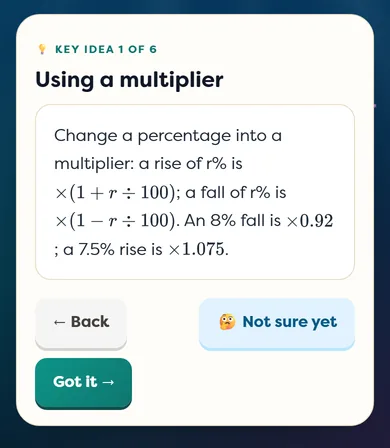
📘 Study
Grades 7–12Learn a topic on your own, one small step at a time: the key ideas, worked examples, the traps to avoid, then check yourself.
- Tap Study in the top bar.
- Choose a topic. For you shows chapters you have practised that are still tricky. Pick up where you left off opens the topic you did not finish.
- Read each key idea. Tap Got it, or 🤔 Not sure yet to see it again at the end.
- In a worked example, think first, then show the steps one at a time.
- Answer the Check yourself questions. Then try 5 practice questions on the topic.
- Study gives no points: it is learning time. The 5 practice questions at the end give points as usual.
- Some topics have try-it cards: guess first, move the sliders on a graph or a picture, then sort, match or fill in the answer. More topics get them over time.
- A topic shows ✓ when you finish it and get most checks right. Your Study steps are kept on this device.
- Learning a chapter on Practice? Tap 📘 Learn it step by step to open its first topic here.
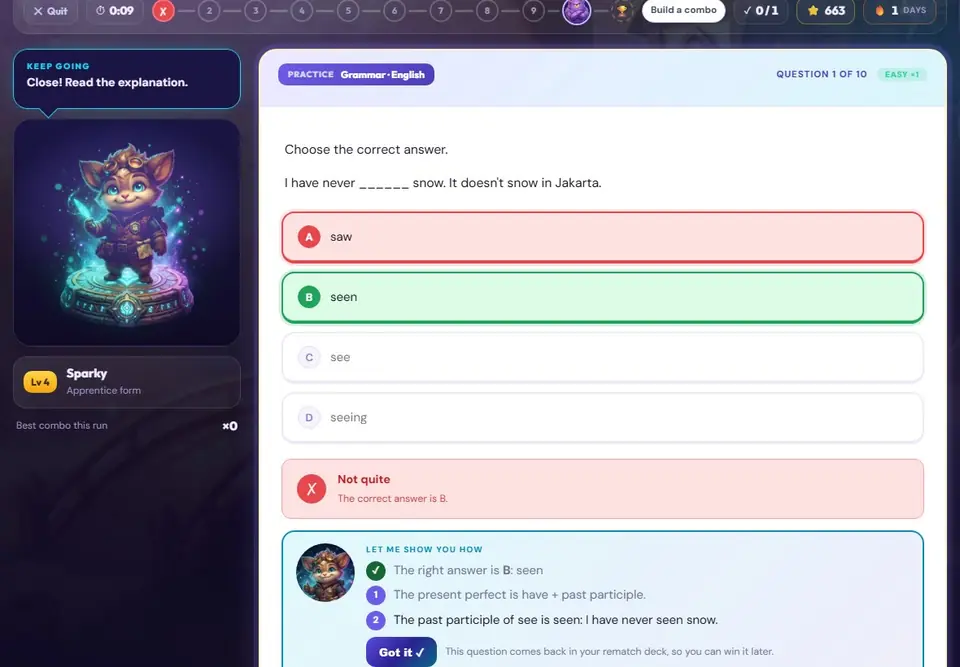
💡 When you get it wrong
Mistakes are part of learning. A wrong answer never takes points away.
- 💛Wrong? That is OK!
- 👀Your friend shows you how.
- 🤔Not sure? Tap I don't know this yet.
- Look for a box under the question. Sometimes it tells you the mistake you probably made.
- Your companion shows you the answer, step by step.
- Not sure? Press I don't know this yet instead of guessing. It costs nothing.
- A missed question comes back in your rematch deck: the next day, then after 3 days, then after 7 days. Get it right 3 times and it is gone. A miss moves it back one step, not to the start.
- 🧑🏫 Check my homework (More on the home page): your companion did five maths questions. Is it right? If not, show it the right answer. No points, just helping a friend, and you see how to do each one.
- Was a Maths chapter hard in a run (half right or less)? At the end, 🧱 Try this first shows the earlier chapters it builds on, with a quick way to warm up there or read the key ideas.
- Was a Maths or Science topic tricky in a run? At the end you may see 💡 Tricky topic: the key idea, how one of the questions is solved, and 5 new questions to try. Three days later a Quick check waits in My next steps.
- Every rematch win cleans a fossil. Polished fossils go to the Fossil Museum on your island. Some fossils have a 🔍 See the real fossil in 3D button: turn a scan of a real museum fossil with your finger, and on many tablets press 📱 Put it on your desk.
- Does a question look wrong, or is a picture missing? Press 🚩 report after you answer. Eduversal checks every report.
- Looking back at a run? Press 🖨 Print or save as PDF to keep your answers, the right answers and the steps on paper. Choose Ones I missed first to print only those.
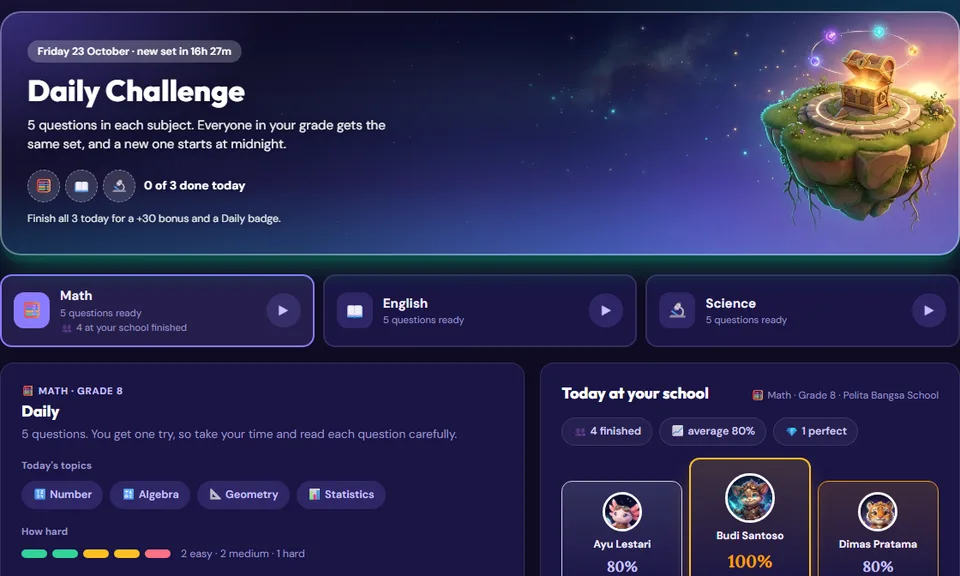
🌅 Daily Challenge
5 questions for each subject, every day. Everyone in your grade gets the same questions.
- 🌅5 questions every day.
- 👫Your grade gets the same ones.
- 🔥Come every day for your streak.
- Tap Daily.
- Choose a subject.
- Answer the 5 questions.
- See how your grade at your school did today.
- A new challenge starts every night at 12:00, Jakarta time.
- Earn points on a day and your 🔥 streak goes up by 1. Weekends and holidays never break it. Miss a school day and it starts again from 1.
- Yesterday: look back at yesterday's questions, with the answers and the steps. Today's answers open tomorrow, once everyone has had a go.
- Coming tomorrow shows the topics in tomorrow's challenge, so you can practise them first.
- Finish every subject on the same day for +30 and a Daily badge.
- The Daily Cup: every right answer this week is 1 point for your grade's cup at your school.
- Got one wrong? Tap 🎯 3 more on what you missed for new questions on that topic.
🗺️ Journey
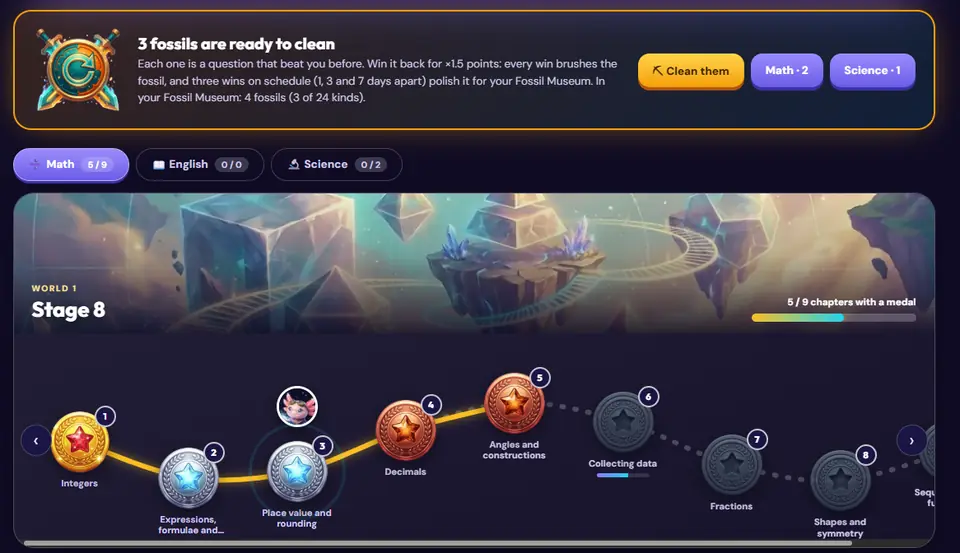
Your map of chapters. Every coursebook is a world, and every chapter has a medal.
- 🗺️Every chapter has a medal.
- 🥉Practise to win Bronze, Silver and Gold.
- 🏅Your medals stay forever.
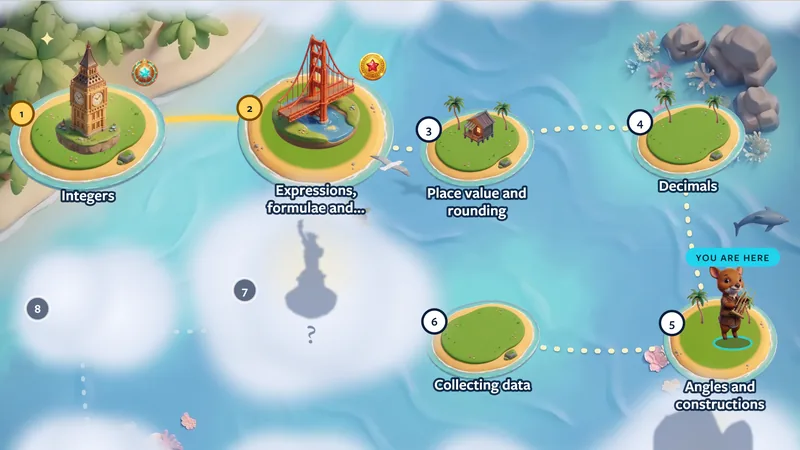
- 🌫️Play a chapter to clear the fog on your map.
- Tap Journey.
- Choose a world (a coursebook).
- Tap a chapter and press Play.
- Practise to win its medal: Bronze → Silver → Gold → Crown.
- A medal is yours forever. It never goes down.
- Your Rematch questions are here too. Play them to clear them.
- 🗺 Hidden Map shows your chapters as painted islands under fog. A numbered route joins them in book order. Practise a chapter to clear its fog. The big shapes in the fog are landmarks, famous places from around the world: win Gold to wake one and the Crown to open its treasure. Wake every landmark to find the Golden Harbour. Your companion stands on the island to play next and walks the route when you move on. Tap 🛤 Trail for the old view.
- 🌍 Big map (Maths) is a map of your maths. Science has a Big map too: Biology, Chemistry, Physics and Earth & Space, and each science chapter also shows the Primary science and the maths it uses. My chapter puts your chapter in the middle: what it needs on the left, where it helps on the right. Tap any chapter to move it to the middle, and tap + to open the next branch. My year lists your grade's chapters in coursebook order. Whole maths shows all maths from Grade 7 to Grade 12. Interactive opens one area (Number, Algebra, Geometry …) at a time, then its strands and chapters; Expand all opens everything. Table shows every chapter at once, areas down the side and grades across the top. Before you start a maths chapter, tap 🎯 Am I ready? 3 quick questions on its card: three short questions on the earlier skills it needs. If you miss one, it tells you which chapter to look again at, with a link. There are no points; it is only a check.
- 🧱 This chapter builds on (Maths): open a chapter to see the chapters of your grade it stands on that have no medal or only Bronze yet. Tap Warm up there to practise one first.
- 🔭 Telescope: once a day, tap it and then an island in the fog. The fog thins for a moment and shows the chapter's name, and whether a landmark waits there.
- 🏅 Map stamps shows how many landmarks of this book you have opened with a Crown. Each one gives a short story and a stamp.
🏝️ My Island
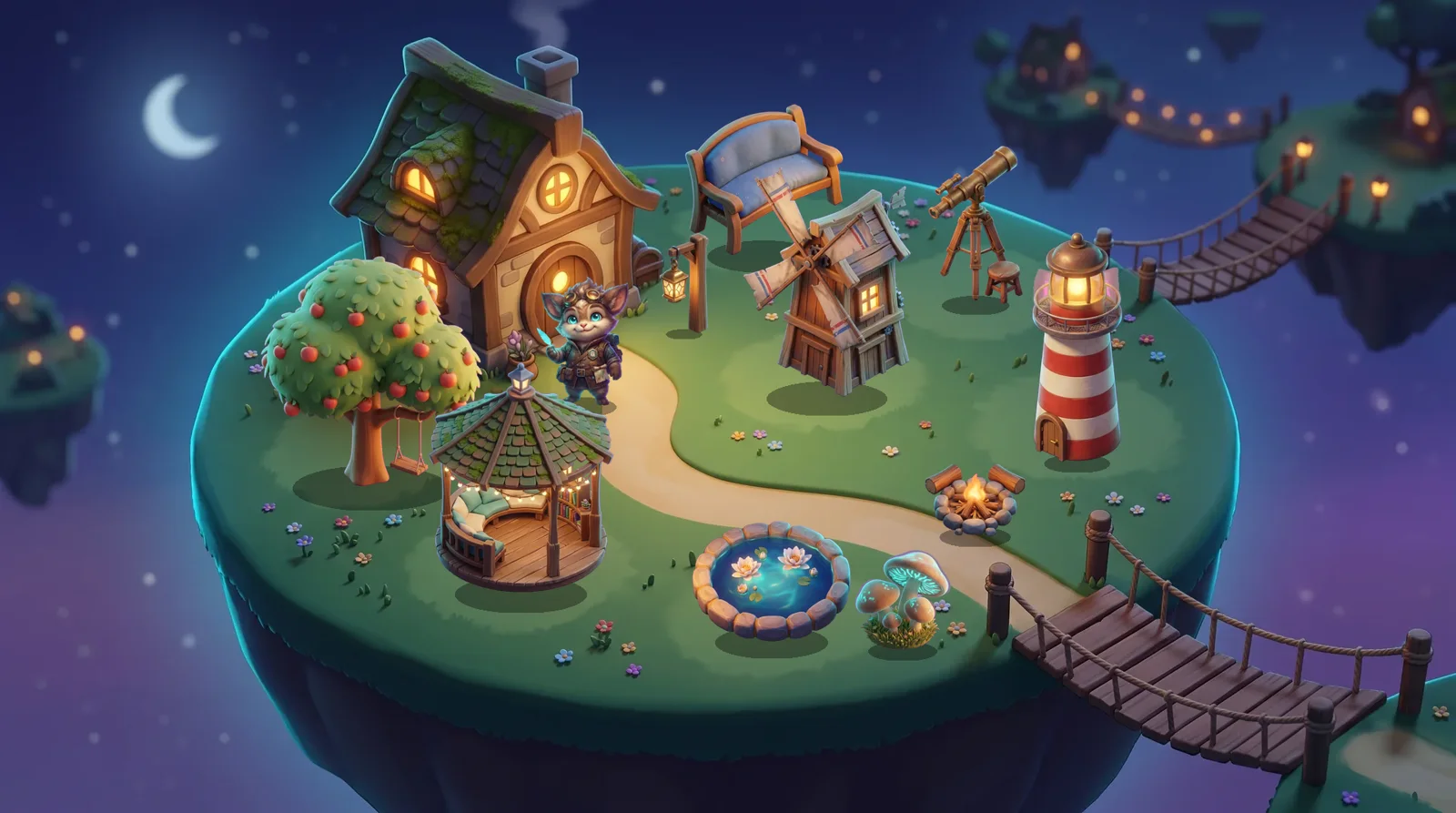
Your own island. It grows with effort, not with right answers.
- 🏝️Your own island!
- 🐢Finish a run. Go slowly and carefully.
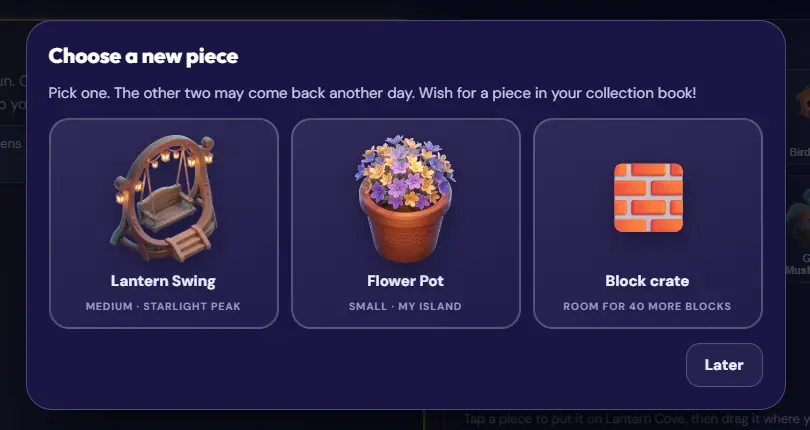
- 🎁Pick a new piece for your island.
- 🌱Plant seeds in your garden.
- Finish a practice run with 5 or more questions. Take your time on each one.
- Choose 1 of 3 new pieces. You can get 3 pieces a day.
- Drag it anywhere on the grass. Move it, flip it, or make it bigger or smaller.
- Plant seeds in your garden. Come back about 18 hours later to harvest.
- 14 pieces open a new island: Lantern Cove. 14 more open Starlight Peak, and 14 more open Wisdom Isle.
- On Wisdom Isle, solve real-science puzzles in six places, from Clockwork Yard to the Healers’ Garden (43 puzzles in all, opening one by one), and collect what you find in the House of Wisdom, a library you can visit any time.
- 3 careful runs in one chapter give you a chapter statue.
- ✨ Discoveries: some pieces start a little science scene when you put them close together, like the windmill and the wishing well. There are 6 to find. The Book of Discoveries gives you clues.
- 🐾 A piece with a paw mark, like the Lily Pond or the Bamboo Gate, makes a habitat. It helps animals that need it come to visit at night in the Lab Valley.
- Visit your schoolmates' islands and leave one ❤️ on each island a day. You can also send a flower seed to a classmate.
- Rushing does not count. The island never gives or takes points.
- A careful run has no answer in under 2 seconds and about 5 seconds or more on most questions. Right answers are a bonus: they bring sunshine for a bigger harvest. If a run does not count, the results screen says why. Tap 🗺 How it works on My Island to see how each place opens.
🔬 Lab Valley
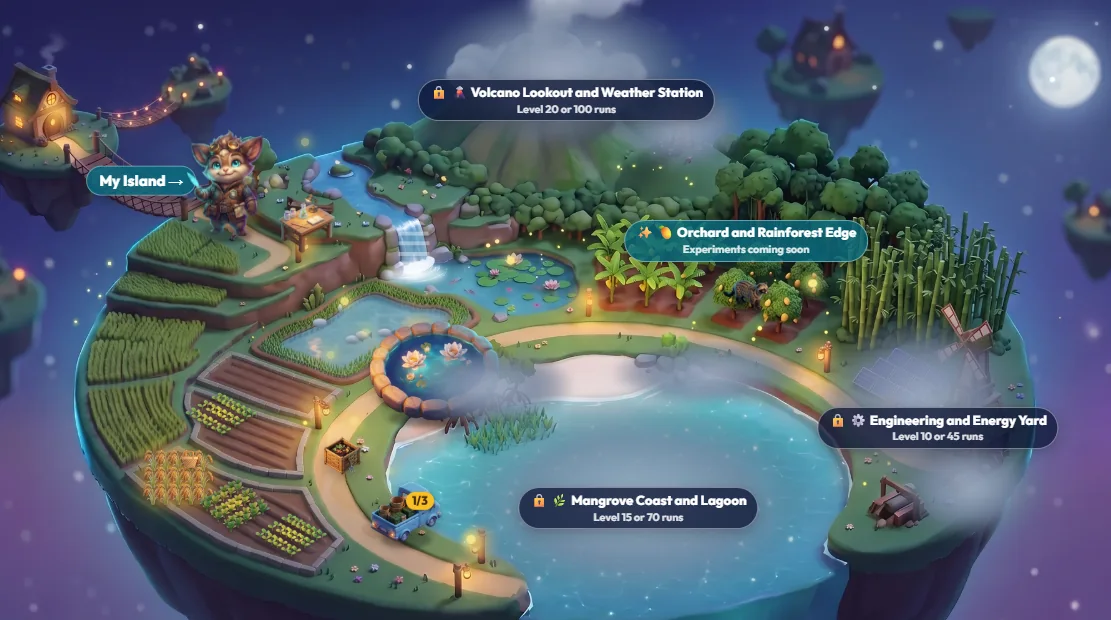
Cross the rope bridge from My Island to a bigger island with gardens and science labs.
- 🌉Cross the bridge from your island.
- 🌾Grow food and cook it.
- 🔬Try science labs.
- 🦌Animals visit at night.
- Open My Island and cross the bridge.
- Plant seeds and harvest crops. Cook them into Indonesian dishes in the kitchen.
- Open the lab bench. Predict, test and explain, like a real scientist. Each lab goes into your lab notebook.
- At night, Indonesian animals come to visit. A first visit leaves a gift for your companion.
- New zones open when your level goes up or when you finish more careful runs.
- Your first mission is Mina Padi Rescue: help a farmer with his rice-fish paddy.
- You can start up to 3 new labs a day. Labs open one after another: finish one to open the next.
- 🚚 Food truck: load up to 3 dishes you cooked and send it once a day. Every dish earns a star, and a load with 3 food groups earns 1 more. Stars bring rare pieces for your island, the first at 3 stars.
- The valley never gives or takes points.
🧱 Workshop
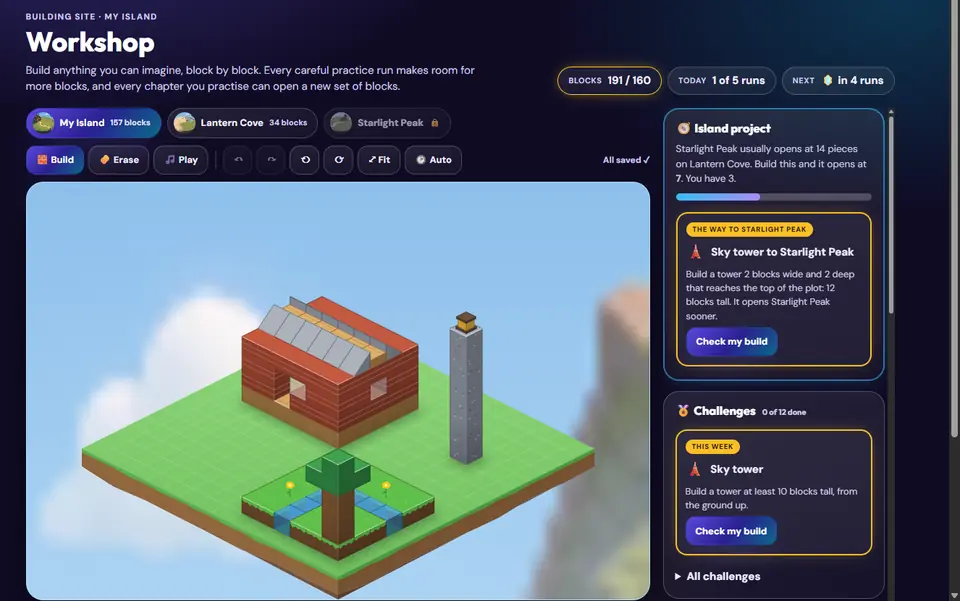
Grades 4–12Build anything you like, block by block. Your builds stand on your island.
- Open the Workshop from My Island.
- You start with room for 80 blocks. Every careful run adds room for 20 more (up to 5 runs a day).
- Practise chapters to open new blocks. Fractions opens half blocks. Symmetry opens a mirror tool.
- Try the weekly challenge and press Check my build.
- Build a bridge, a sky tower or a library arch to open the next island sooner.
- Taking a block away gives its room back. Nothing is ever lost.
🧭 Atlas
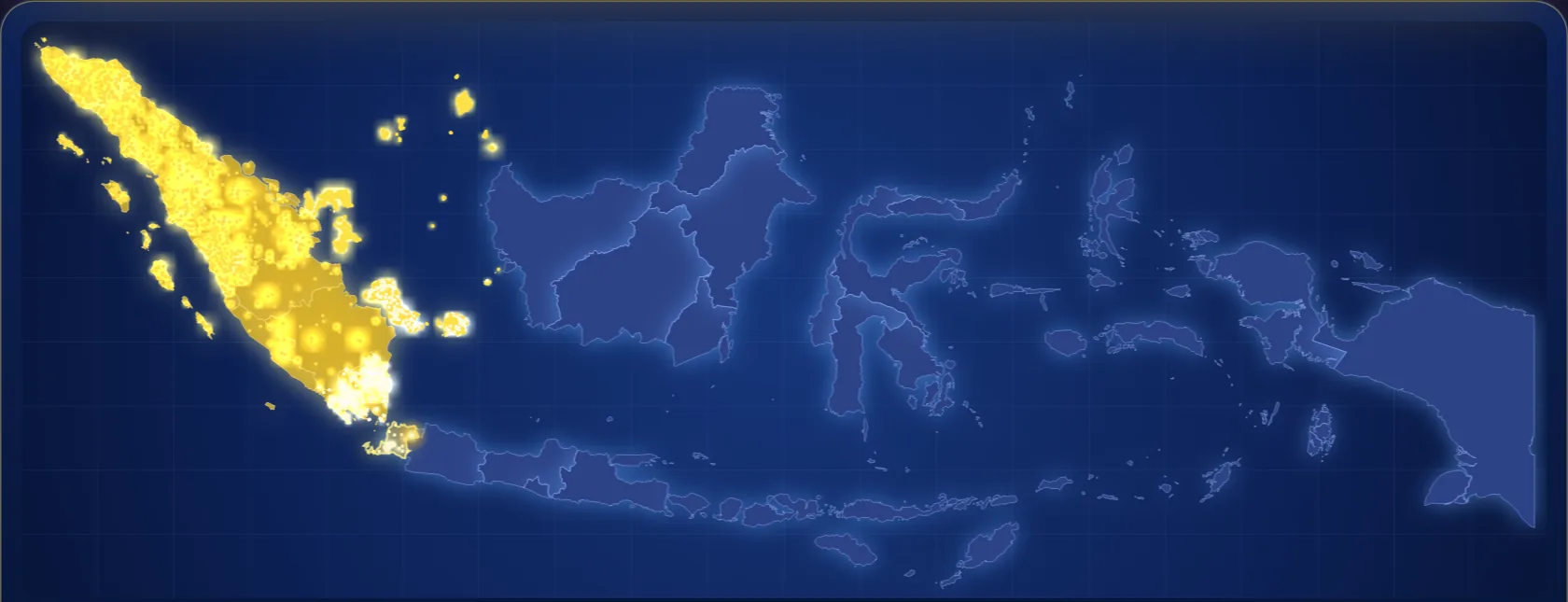
A map of Indonesia with 17,380 lights, one for each island. Every careful practice run, by any Sparkuna student, turns one on.
- 🗺️A map of Indonesia.
- ✨Your practice lights up the map.
- 📖Open a story. Play with its picture.
- On your home page, tap 🌏 Atlas in the More row.On your home page, tap 🌏 Atlas in the More row.Tap 🌏 Atlas in the top bar. See how many islands you, your school and everyone have lit.
- When a whole province is lit, its card opens. Tap it to see a photo and one true fact.
- Tap a 🧭 landmark to start a Jejak Nusantara trail. Measure, count and test, then collect the stamp for your passport.
- Tap The people behind it on a card, or open a story on the 📖 Stories from Nusantara shelf, like the rice farmers of Bali. Meet the people, explore a living picture and keep a page in your journal.
- Your first light brings a 🏮 lamp post to My Island.
- When every light is on, the map starts again from Sabang for a new round. Map filled shows how many times. A card you opened stays open.
- Use the Layers buttons above the map to show province names, the route, progress colours or a day map.
- Zoom in with + and − or with two fingers, up to 4 times. Drag to move the map. ⤢ shows the whole map again.
- Three days after you finish a story, a short check opens. A story gives a stamp, not points.
- After a run, your results may show a story to read. Tap Read → to open it.
- Your school may have its own trail. Look for the QR card at school and scan it.
📚 Reading
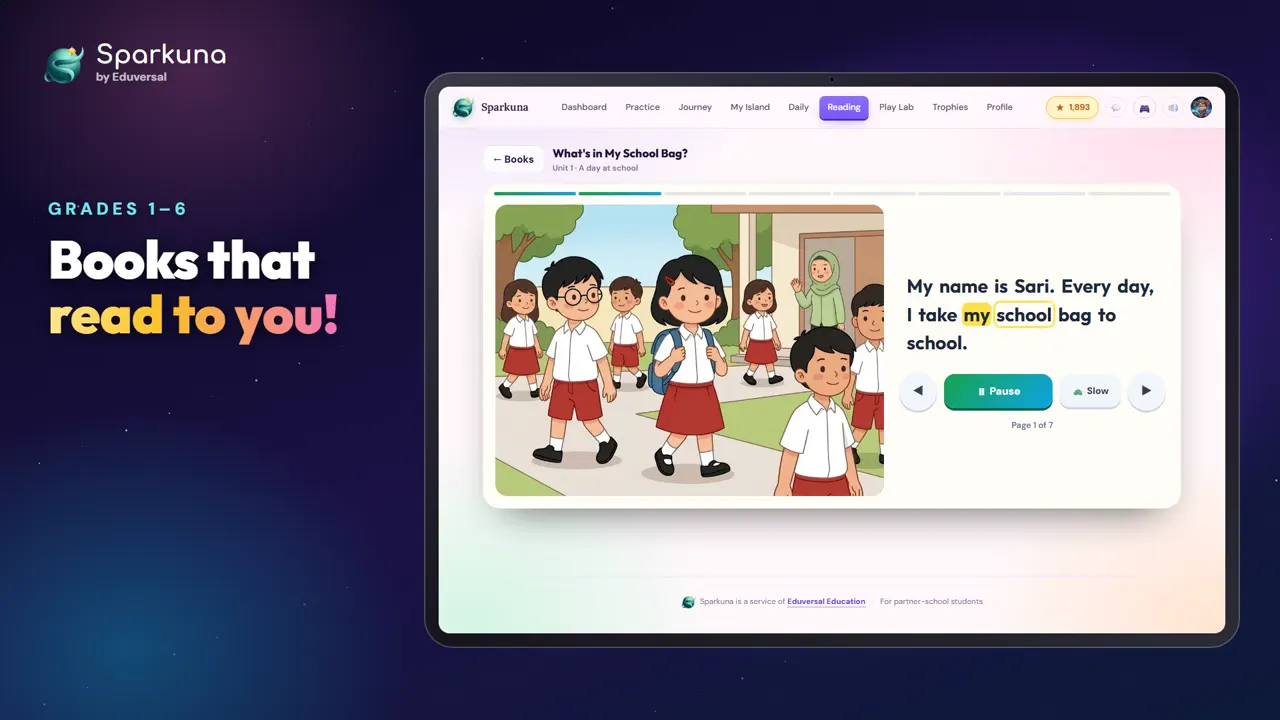
Grades 1–6Picture books that read to you. Every word lights up.
- 📚Books that read to you.
- 🔊Listen, or read it yourself.
- ❓Then answer 5 questions.
- Tap Reading. Your books are sorted By level. Start with the books of your level.
- Choose a book. Press 🔊 to listen, or read it yourself.
- At the end, answer 5 short questions.
- Tap By topic to see the units. Read all the books in a unit to win a medal.
- Get ⭐⭐⭐ on the quiz of 6 books of your level. Then the next level opens. Your teacher can also pick a level for you.
- If your school has switched it on, tap 🎙 Record yourself reading it at the end of a book. Your teacher and your family can listen.
- A book you finish gives 5 points. Up to 4 books a day give points.
- Press 🖨 Print or save as PDF in the reader to print the book with its pictures.
✍️ Writing
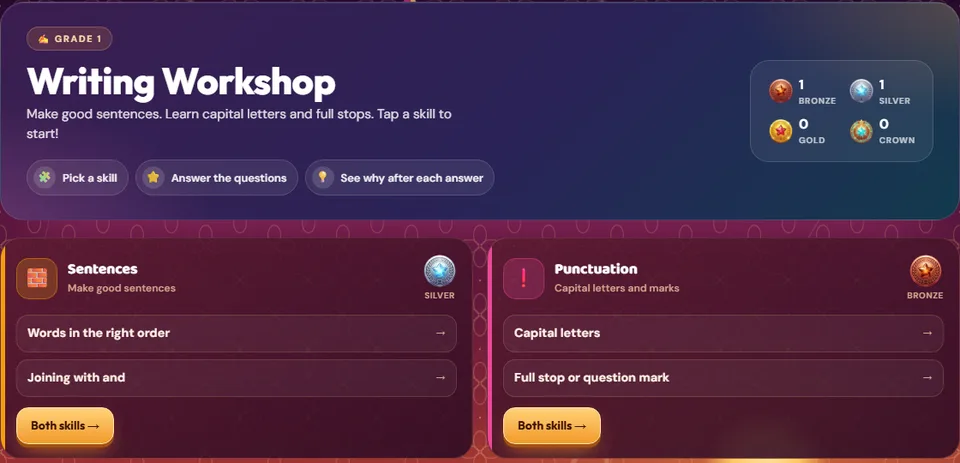
Grades 1–6Practise the skills of good writing: sentences, capital letters and marks, and putting ideas in order.
- ✍️Tap Writing.
- 🧩Pick a skill.
- 💡See why after each answer.
- Tap Writing in the top bar, next to Reading.
- Each card is a chapter: Sentences, Punctuation, Writing a text and, in Grade 6, Checking my writing.
- Tap a skill to practise it, or Both skills to mix the chapter.
- After every answer you see why it is right. A wrong pick often tells you what slipped.
- Right answers give points, like Practice. Each chapter has its own medal, the same as in Journey.
- A question you missed comes back later in your rematch deck.
✍️ Writing check
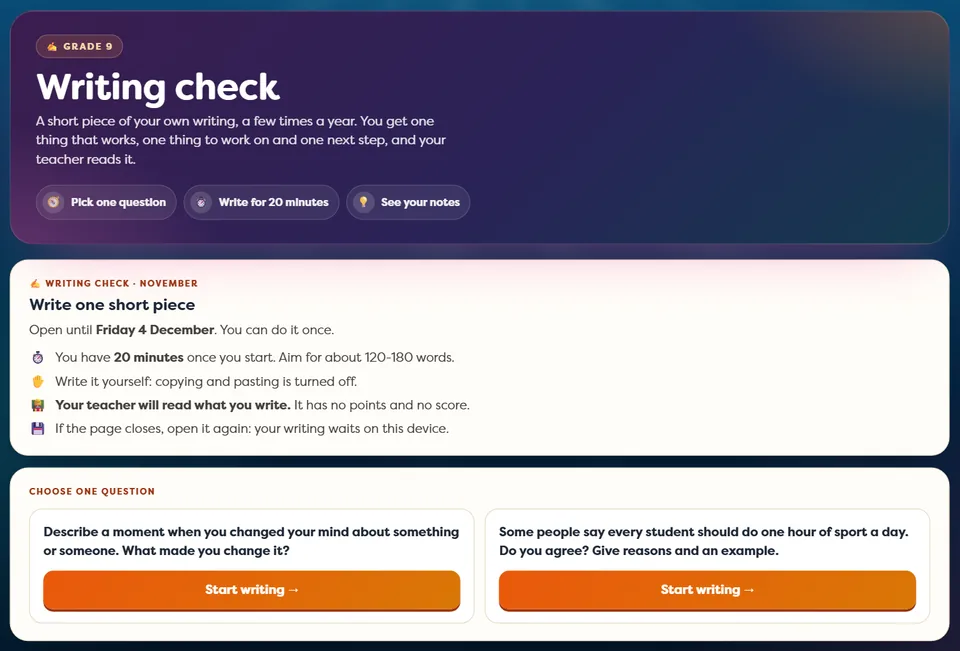
Grades 7–12A few times a year you write one short piece of your own. It shows you, and your teacher, how your writing grows.
- Tap Writing in the top bar, next to Reading. A card on your home page shows when a check is open.
- Read the two questions and pick one. Tap Start writing twice to start the 20 minutes.
- Write it yourself: copy and paste are turned off. The timer is at the top.
- Tap Hand it in twice. You see one thing that works, one thing to work on and one next step.
- The checks are in November, January and May. You can hand in once in each.
- Your teacher reads what you write. It has no points and no score.
- If the page closes, open it again: your writing waits on your device until you hand it in. When the time is up, it is handed in for you.
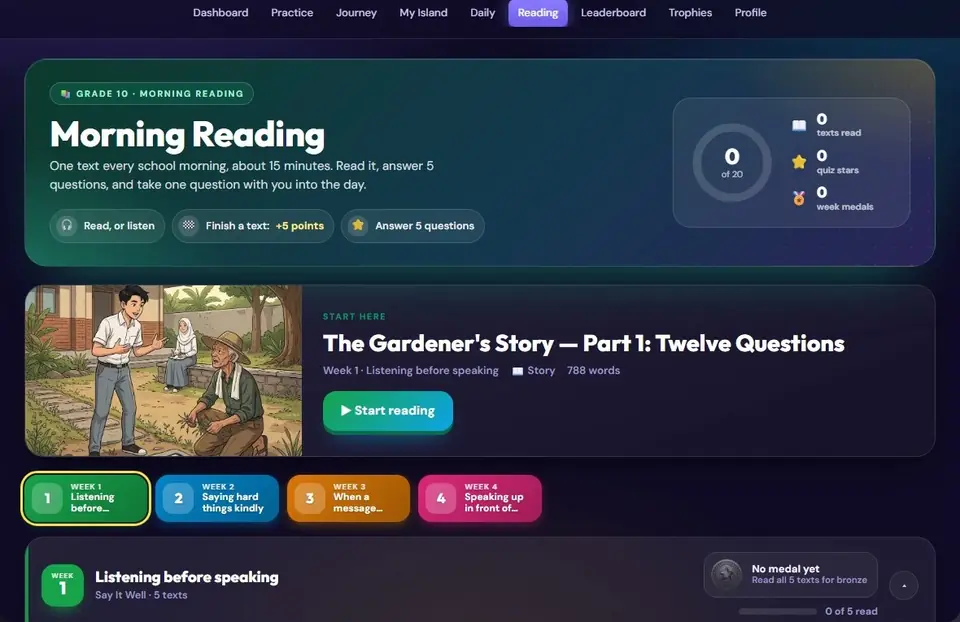
📖 Morning Reading
Grades 7–12A new story or article for every school morning. It takes about 15 minutes.
- Tap Reading.
- Open today's text. Read it, or press Listen.
- Answer 5 short questions.
- Keep the Think about it question for your class talk. It has no score.
- Want to write your answer? Tap ✍️ Write your answer, then Check my writing. You get one thing that works, one thing to work on and one thing to try.
- Finish a text for 5 points. Every week of 5 texts has its own medal.
- Your written answer is saved only on your device. Nobody else sees it, and it has no points.
- Press 🖨 Print or save as PDF in the reader to print the text, the question of the day and the words to know.
- A word with a dashed line is a new word from Word Cards. Tap it to see what it means, and tap + Add to my Word Cards to learn it later.
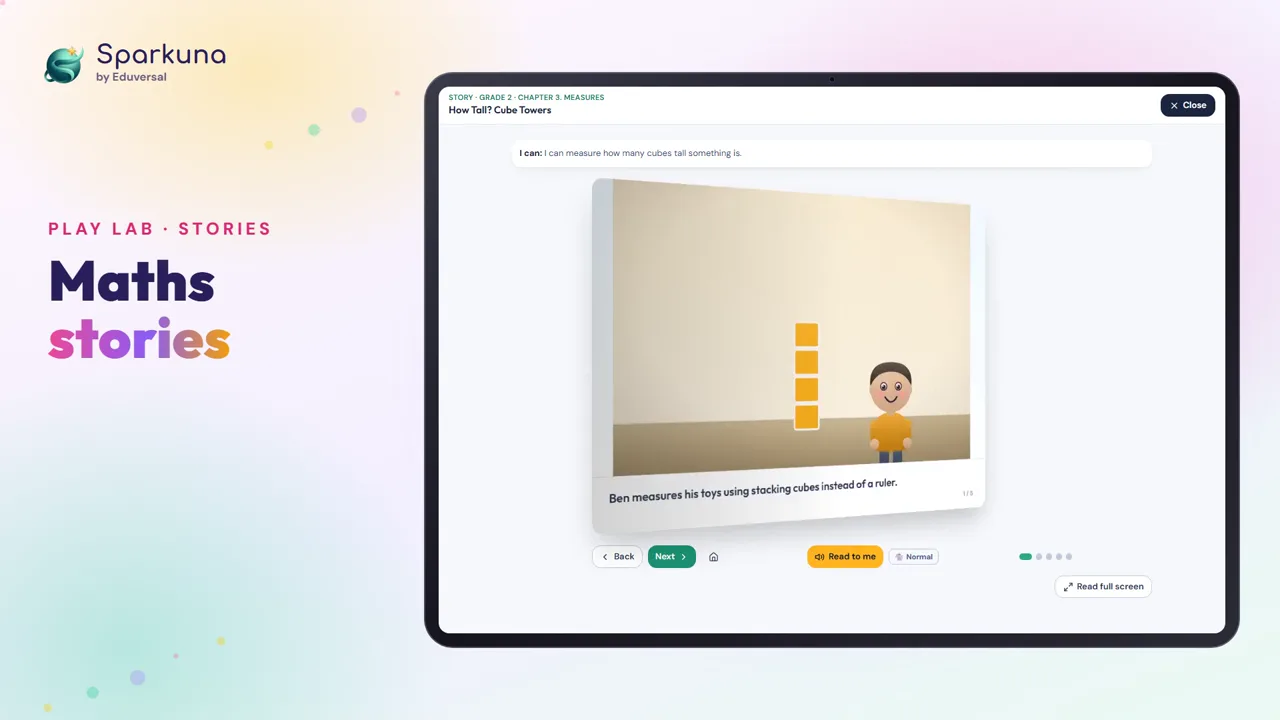
🎮 Play Lab
Grades 1–6Games, things to explore, stories and simulations for the chapter you are learning.
- 🎮Games and stories.
- 🏆Win a game. Get 5 points.
- Tap Play Lab.
- Choose a subject, then a chapter.
- Win a game, finish a story, or solve a challenge.
- Each activity gives 5 points, once a day. Play Lab gives points for 4 activities a day.
- 🔬 Simulations are under the games. Guess first, try it, then answer two questions. Your first finish of each one gives 5 points.
- 🗞 Spot the Hoax is an English game. You are a reporter at the school paper: tell facts from opinions, check where a story comes from, and fix the headline.
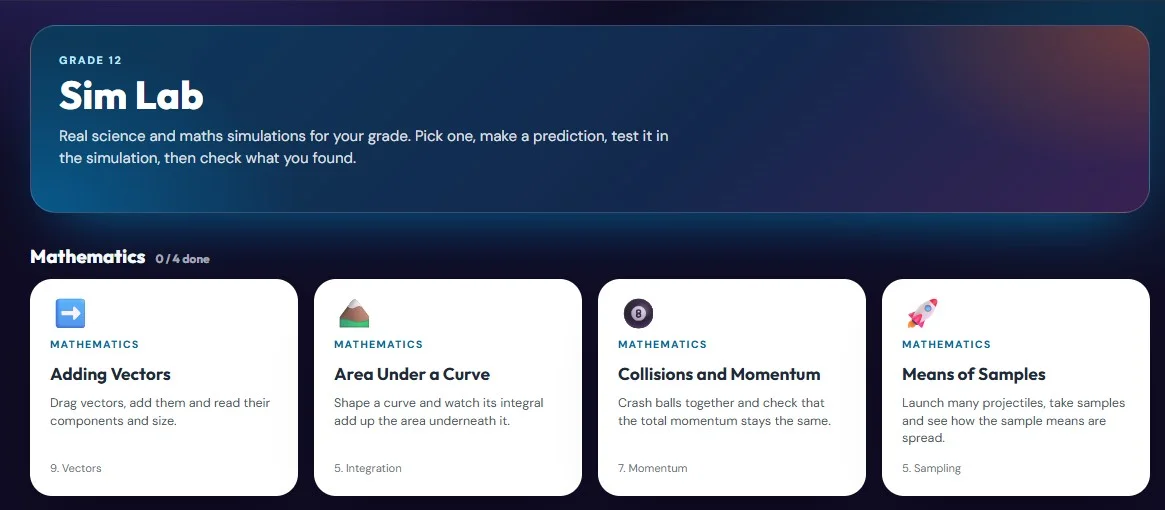
🔬 Sim Lab
Grades 7–12Real science and maths simulations for your grade.
- On your home page, tap 🔬 Sim Lab in More, and choose a simulation. Each card shows the chapter and topic it is for, and Find by chapter shows the ones for what you are studying.
- Predict: what will happen?
- Test it in the simulation, step by step.
- Check: answer 2 questions about what you found.
- Finish one for the first time, with at least one check right, for 5 points. Up to 4 a day.
- In Practice, a chapter or topic that has a simulation shows a 🔬 link to it, and so do your results.
- 📏 Measure it cards (Grades 7, 9 and 10) are our own: read an ammeter, a voltmeter, a thermometer, a measuring cylinder, a beam balance, a vernier caliper or a micrometer. Zoom in close, type what you read and tap Check. After two tries, Show me how walks you through it.
- 🧭 Construct it cards (Maths, Grades 7, 8 and 9) are our own too: a pair of compasses and a ruler on the screen. Press on a point for the needle, drag out to open the compasses, then drag round to draw an arc. Every place where arcs and lines cross becomes a point you can use. Bisect a line or an angle, make 60°, 30°, 90° and 45°, a hexagon in a circle, or a triangle from its three sides. Show me draws it step by step.
- 🧫 Virtual labs (Science, Grades 7 and 8) are whole practicals made by our EduSTEAM team: collect the equipment, set it up safely, do the experiment, record what you see and answer the questions. At the end, type your name and download your lab report as a PDF for your teacher.
- ⚗️ Test-tube Lab cards (Chemistry, Grades 7, 9 and 10): test unknown samples with drops, gases and a flame, write what you see in the table, then work out which tube is which.
- 🫀 3D science models (Grades 7–10): a cell, the layers of the Earth, moving plates, a beating heart, a leaf, a motor, the eye and a flower. Turn them, pull them apart and cut them open to see inside.
- Cards with an orange Sparkuna label are our own 3D simulations for Maths: turn and zoom them with your finger. One takes you round Borobudur to count its stupas. They can also stand on a card through your camera: see Shapes on a card.
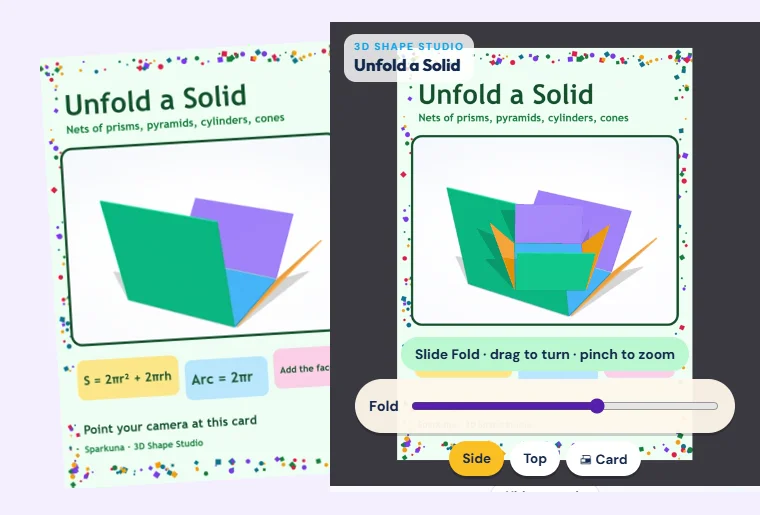
📷 Shapes on a card
Grades 7–9See a Maths shape stand on a card through your camera, then fold it, turn it and measure it.
- Get the card: your teacher may give you one, or open the cards on another screen. Each shape has its own card.
- Tap your picture at the top, then 📷 Shapes on a card (or open Sim Lab and look for the 📷 AR label). Choose a shape, make your prediction, then tap 📷 See it on a card.
- Tap Start camera, allow the camera, and point it at the card. Hold still for a moment.
- Drag with one finger to turn it, pinch with two to zoom. On a net, slide Fold to fold it. The tasks are in the panel, as usual.
- Go back to Sim Lab and answer the two questions.
- Lay a printed card flat in good light, with all of it in the picture. A card on a screen works too: look at it from the front.
- No card? On an iPad, choose Put it on your desk. No camera? Use it without the camera is the same simulation.
- The camera picture stays on your device. Nothing is recorded or sent.
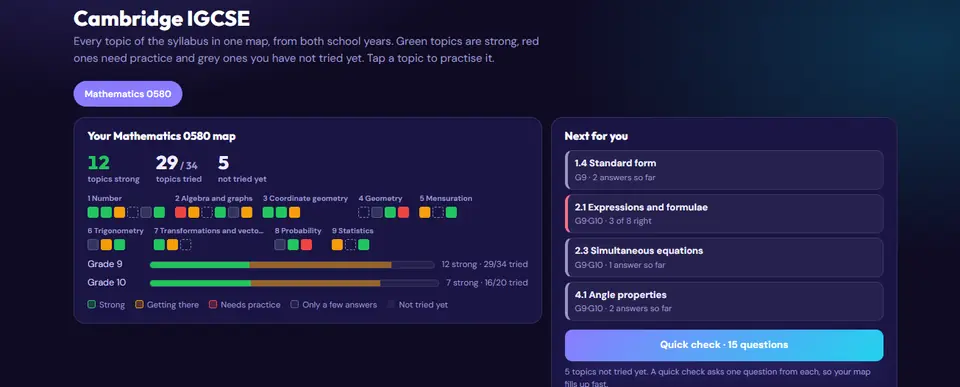
🎯 Exam prep
Grades 3–12A map of every topic in your Cambridge exam: Checkpoint, IGCSE or AS & A Level.
Practice tests for your grade: whole tests, one question after another, with your score and every explanation at the end.
- 🧪Tap Practice, then Unit tests.
- 📝Do a whole Science test.
- ✅See your score and the answers.
- Tap 🎯 Exam prep in the top bar.
- Tap Practice, then the 🧪 Unit tests card.
- Press Open my map.
- Green = strong. Red = needs practice. Grey = not tried yet.
- Tap a topic to learn it, practise it or print it.
- Pick a test and press Start. Answer every question in order. You can stop and Continue later.
- At the end, see your score. Tap See my answers for every explanation.
- A 15-question quick check fills your map fast.
- When you finish a paper or a set, the Next button opens the next one you have not done yet.
- 🧪 Unit tests: one Science test for each unit of your year, written by teachers of the Eduversal Science Department.
- 🏅 OSN SD: Matematika, IPA and IPS practice sets of 30 questions, in Bahasa Indonesia like the olympiad. OSN SD is for Grades 4 and 5; for you, the sets are practice.
- 🧭 Primary Checkpoint: mock papers and review papers in Mathematics, Science and English.
- 📚 TKA SD: 10 Matematika sets and 10 Bahasa Indonesia sets of 30 questions, in Bahasa Indonesia like the test. Some questions ask you to mark each statement Benar or Salah. In Bahasa Indonesia, every question is about a short text.
- 📚 TKA SMP: Matematika and Bahasa Indonesia sets of 30 questions (75 minutes), in Bahasa Indonesia like the test. Some questions ask you to mark each statement Benar or Salah. In Bahasa Indonesia, every question is about a text. More sets are coming before the test.
- 📐 IGCSE exam-style: long questions in Mathematics, Physics, Chemistry and Biology, like Paper 4. You read one situation, then answer parts (a), (b), (c) in order; each part shows its marks, such as [2]. When a later part needs an earlier answer, it tells you the value, so one slip does not stop you.
- ⏱ Exam mode: many tests can also be done like a real test, with a clock. Your answers are checked at the end, not one by one. Each test can be done once in exam mode; a SAT-style section test shows an estimated score range, and the full SAT-style test (Reading and Writing, a 10-minute break, then Math) shows an estimated total on the 400-1600 scale. Before you start, the page shows a picture of the test screen.
- 📅 My test date: on an exam's page, add the day of your real test. Sparkuna shows the weeks left and a small plan for each week: a few practice runs, and a practice test as the day comes close. Only you see it, and a missed week takes nothing away.
- 🗓 Your exams: the top of Exam prep lists the exams of your grade with their official days and the weeks left: Cambridge Checkpoint (Grade 8), IGCSE (Grade 10) and AS & A Level (Grade 12), and the national tests (TKA, UTBK-SNBT). On your Cambridge map you also see how many topics you have tried, and about how many new topics a week reach every topic before the exams. Your school gives you the day of each paper.
- 🎯 After a SAT-style, IELTS-style or UTBK-style test in exam mode, your result names the part you found hardest. Tap Practise under it to start practice on just that part.
- If your school opens it, SAT-style practice and more are here too.
- 📌 Your teacher can set you Exam prep work, for example one SAT-style skill area. It shows on your home page with your other work from your teacher.
- If your school opens it, TKA practice is here too (from Grade 11, a year before the test): Bahasa Indonesia, Bahasa Inggris, Matematika, Fisika, Kimia and Biologi, in Bahasa Indonesia like the real test. Every explanation gives the English term you know. ⏱ Timed sets work like the computer test, one subject at a time: Matematika (25 questions), Bahasa Indonesia and Bahasa Inggris (30 each), 75 minutes each.
- 🏫 UTBK-SNBT: practice in all seven subtests, and four whole Try Outs in exam mode: 160 questions in 195 minutes, and each part has its own clock. At the end you see your right answers in each subtest, not a UTBK score.
- If your school opens it, IELTS-style Reading and Listening practice is here too, with two whole Reading tests (40 questions, 60 minutes) and two Listening tests in exam mode: one recording in four parts, played once with every question open, then 2 minutes to check your answers.
- 🌱 Checkpoint ESL-style practice: Reading and Use of English, like the Cambridge Lower Secondary Checkpoint test.
- 🌐 IGCSE ESL-style practice: reading texts with questions, and writing skills.
- 📝 General Paper-style practice: comprehension texts and essay skills.
- 🏅 Olympiad (OSN): Maths olympiad practice for everyone who wants it, one week of the route at a time. Questions and solutions are in Bahasa Indonesia, and every solution gives the English word you know.
- IGCSE Readiness shows which Grade 9 topics you are ready for in Grade 10. Open it from the strip on your IGCSE map. If your teacher sends you a topic to practise, it shows on your home page.
- AS Level Readiness shows which IGCSE topics you can already use for your AS subject. Open it from the strip on your AS map. Not learned a topic yet? Say so instead of guessing. You practise the gaps on your IGCSE map.
- Learning a topic? Press 🖨 Print or save as PDF to take its Key ideas and worked examples on paper.
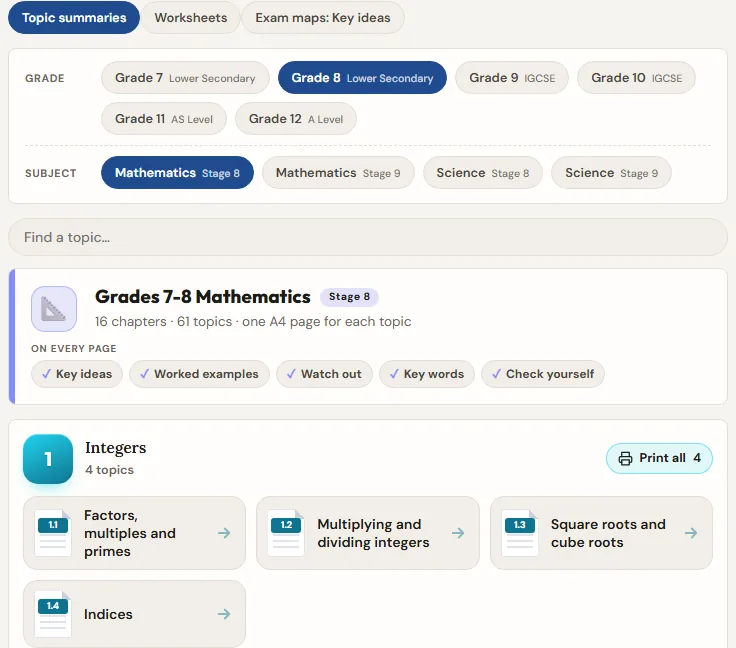
🖨️ Sheets: print and learn
One A4 page for each topic, to read, print or keep in your notebook.
- On your home page, tap 🖨️ Print and learn in More.
- It opens on your grade. Pick a tab: Topic summaries, Formula sheets, Proof cards, Worksheets or Exam maps.
- Tap a chapter's small page to open that topic. Or press Print all for the whole chapter.
- Press 🖨 to print it, or save it as a PDF.
- Topic summaries have the rules, worked examples and a quick check, with the answers upside down.
- After a Maths or Science run, your results show a 📄 link to the summary of the topic you found tricky. It opens in a new tab, so your results stay open.
- Worksheets are the topic's Sparkuna questions on paper. Scan the QR code on the sheet to answer the same questions and check them.
- Exam maps give the Key ideas of an exam topic, and a fill-in page to cut and stick in your notebook.
- Formula sheets put every formula of your course on one or two pages. The ones marked Given are printed on the exam paper. Learn the others by heart.
- Proof cards show why a rule is true, such as Pythagoras' theorem, in a few pictures. Follow the pictures in order, then try the question at the bottom.
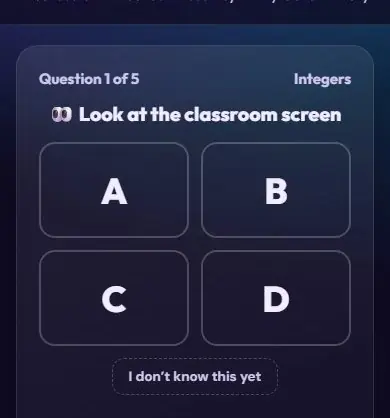
📺 Live Class
Your teacher runs a quiz on the big screen. You answer on your own device.
- 📺Your teacher shows a code.
- 🔢Tap Join. Type the code.
- 👆Answer on your device.
- Look for the 4-digit code on the big screen.
- On your home page, find the Live class box at the top.
- Type the code and press Join.
- Answer. Your teacher shows the answer after each question.
- Your answers count as normal practice. There is no speed bonus, so take your time.
- ⏭ Sometimes your teacher skips a question. Then no answer is shown and the next question comes. An answer you already sent still counts as practice.
- In a 🏆 Competition, fast right answers win game points for the podium. Your Sparkuna points work as normal.
- 👾 Your class may meet the Mix-Up Monster on the big screen. Every right answer from the class pops one of its bubbles. Pop enough and it turns into a friendly cloud.
- 🗣 Sometimes your teacher says Talk it over. Find a classmate with a different answer and tell each other why. Then answer the same question again. The second answer is just for learning: no points.
- 🎯 In a Closest guess class you type a number for each question. When your teacher shows the answer, every number lands on a number line and the closest ones win a medal. Your device shows your own place.
- 🚪 An entry ticket is 3 quick questions at the start of a lesson on what you learned before. Answer on your own: it helps your teacher know where to start.
- 🙋 A 5-digit code is your teacher’s Hands up room: a vote, a word cloud, a question box or a class wall. Type it in the same box. Your teacher checks what you write before the class sees it, and the screen never shows names. No points.
- ⚡ In a Competition you can switch on Double (a right answer scores twice) and Shield (a wrong answer keeps your streak), once each a class, when your teacher has them on. They change game points only.
- Your past live classes are on the Live Class page, under the code box. Tap one to see your answers again. Your home page has a link to them too.
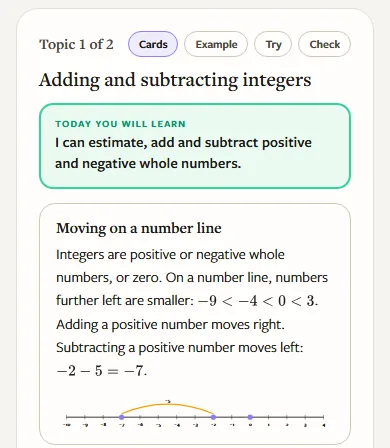
📖 Sparkuna Lesson
Grades 7–12Your teacher starts a lesson. You learn each topic on your own device, step by step, at your own speed.
- Your teacher shows a 4-digit code and a QR code on the screen.
- Go to www.sparkuna.com/lesson (or scan the QR) and type the code.
- For each topic: read the cards, follow the example, finish one yourself, then Try some questions. Hints are there if you need them.
- Then a short Check: 3 new questions, no hints. It says Ready, Almost or Let's look again, and shows you what comes next.
- Your answers count as normal practice: points and medals work as usual.
- ✋ Stuck? Press I’m stuck. Your teacher sees it and comes to help.
- 💬 Sometimes your teacher puts a Talk question on every screen. Talk about it with the student next to you.
- Lessons start with Grade 7 Maths and Science. More chapters come one by one.
 Bronze
 Silver
 Gold
 Diamond
 Legend
 School Cup
🏆 Leaderboard
Grades 4–12See how your practice this week compares with other students.
- On your home page, tap 🏅 Leaderboard in the More row.
- Earn points this week to join a league group of up to 30 students.
- On Monday, the top of each group moves up a league: Bronze → Silver → Gold → Diamond → Legend.
- Each week one subject is the School Cup subject. Your points in it help your school.
- Your league can go up or down each week. Your chapter medals stay forever.
 You
 Your classmate
⚔️ Friendly match
Grades 4–12Answer the same 5 questions as a classmate in your grade, then see who got more right.
- Finish a careful Maths, Science or English run. Under your results, tap ⚔️ Challenge a classmate.
- Pick a name and tap Send and play. You answer the 5 questions first.
- Your classmate sees the match on their home page and answers the same 5.
- The result is on your home page. Send Good game 🤝, or tap Challenge back for a new match.
- Only right answers count, not speed. Take your time.
- Every right answer earns points as usual, and finishing a match adds +5, win or not.
- You can start 3 matches a day. In English, you play classmates on your own level.
- Got a match you don't want to play now? Tap Not now. Nobody is told.
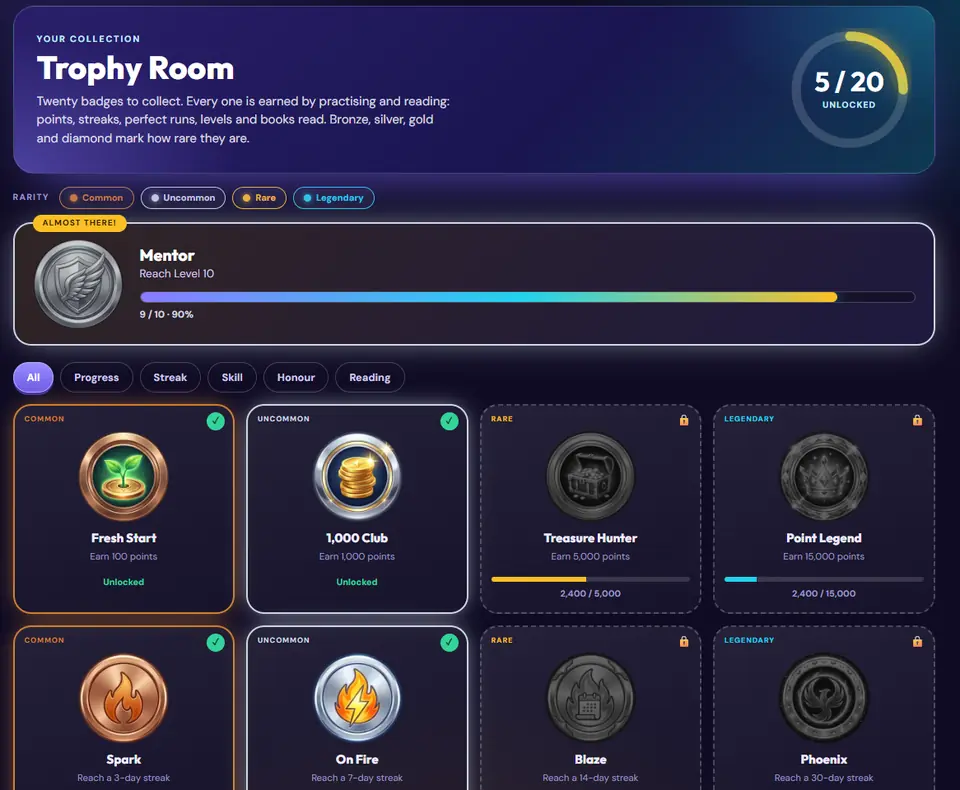
🏅 Trophies
The Trophy Room has 24 badges to collect, and 4 more for readers.
- 🏅Badges to collect.
- 👆Tap a badge to see how to get it.
- Tap Trophies.
- Tap your picture (top right), then Trophies.
- Tap a badge to see how to earn it.
- Keep practising and reading to collect them all.
- Badges come from points, streaks, skill, good work, the Daily Challenge, reading and event stamps.

🦊 Your companion
Your companion comes with you on every run. It grows as you practise.
- 🦊Your friend comes with you.
- 👆Tap your picture to choose a friend.
- ✨Your friend powers up as you practise.
- Tap your picture in the top right. Character Studio opens.
- Choose one of 11 companions. You can switch any time and keep your level.
- Put on the hats, gear and scenes you have earned.
- At Levels 5, 10, 20 and 35 your companion powers up into a new form.
- You can never buy anything. You earn everything by practising.
- 🎬 Watch The Glowing Map, a short film with the six heritage companions, on the Characters page.
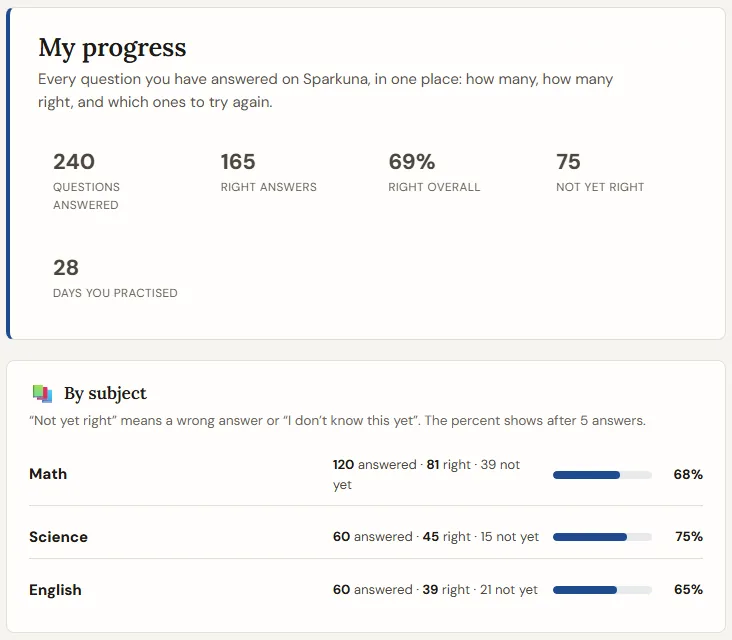
📊 My progress
How many questions you answered, how many were right, and what to practise next.
- 📊Tap your picture. Then tap My progress.
- ✅See how many you got right.
- 📚See each subject and chapter.
- Tap your picture (top right), then 📊 My progress.
- The top shows your questions, your right answers, your % right and the days you practised.
- More than questions shows your level, days in a row, trophies and books, your reading level, the words you know in Word Cards and your Sim Lab simulations. Tap a box to open that page.
- By subject and By chapter show where you are strong and where to practise.
- Practice tests in exam mode: each test you finished, with its estimate. Tap See it for the whole test.
- Questions you met more than once: tap See it to look at a question again, with the steps.
- “Not yet right” means a wrong answer or “I don't know this yet”. It never takes points away.
- Week by week shows how much you practised in each of the last 8 weeks.
- Press 🖨 Print or save as PDF to keep your progress on paper.
- These numbers are for you to learn from. They never count toward your school report.
👤 Profile and settings
Your name, school and grade, and two useful settings.
- 👤Your name, school and grade.
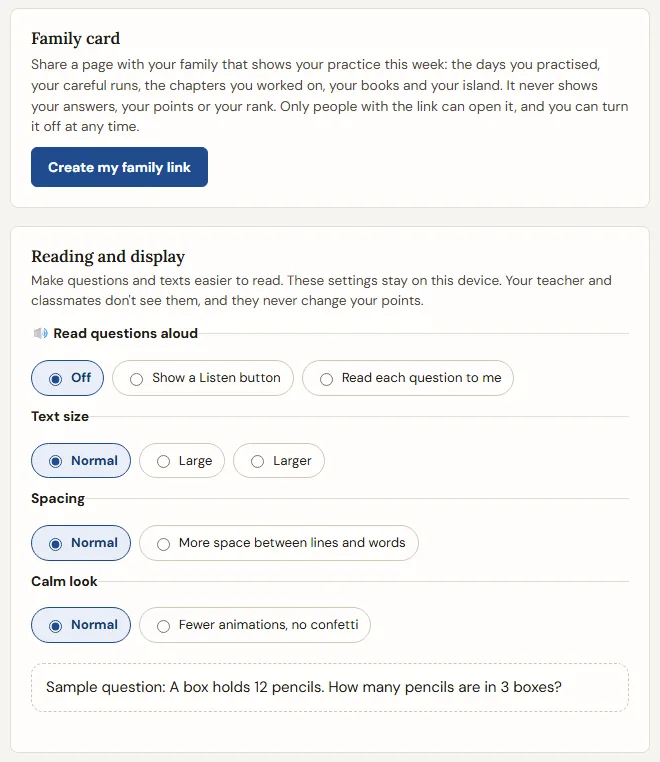
- 👨👩👧Make a Family card for your family.
- 🔤Make the words bigger.
- Tap your picture (top right), then Profile & settings.
- 👨👩👧 Family card: make a link for your family. It shows your effort this week. It never shows your answers or your rank.
- 🔤 Reading and display: a Listen button, bigger text, wider spacing, or a calm look.
- Your grade is fixed. Did you pick the wrong grade? Ask your teacher.
- You can turn the Family card off at any time.
- Added a test day in Exam prep? The Family card shows it too, with your exam practice runs this week and the name of your latest practice test. It never shows a score.
- Want Sparkuna to look different? Tap your picture, then Choose your look. There are seven looks, from fewer colours to more: Paper, Pro, Bloom, Kopi (a morning in a coffee garden), Arcade, Ocean and Batik. Only this device remembers it.
- Sharing an iPad? Tap your picture, then Sign out at the bottom, before the next student uses it.
📋 My Record
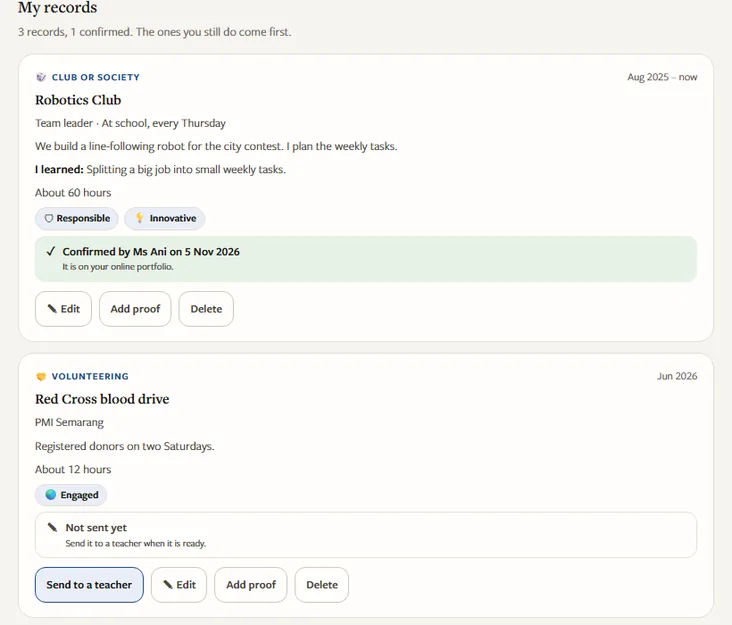
Grades 10–12Everything you do outside lessons in one list: clubs, competitions, volunteering, leading, sport, arts, projects. A teacher confirms it, and you can share it as an online portfolio.
- Tap your picture (top right), then 📋 My Record.
- Press + Add a record. Say what it was, your role, when, and what you did. Choose one to three things it shows: Confident, Responsible, Reflective, Innovative or Engaged.
- Press 📨 Send to a teacher. Any teacher of your school can confirm it on Teachers Hub, or send it back with a note.
- Turn on My online portfolio and copy the link. Send it to a university, a scholarship or your family.
- The portfolio shows only the records a teacher confirmed, with your full name, school and grade. Make a new link or turn it off at any time.
- Change a fact (the dates, the hours, what you did) and the record goes back to a teacher. Changing what you learned does not.
- If your school has it on, press 📎 Add proof to add a photo or a PDF, like a certificate. Only you and your school's teachers can open it; it is never on the link.
- The tiles count your records. They are not scores, and My Record is not part of your school grades.
- Press 🖨 Print or save as PDF for a paper copy with a "Checked by a teacher" column.
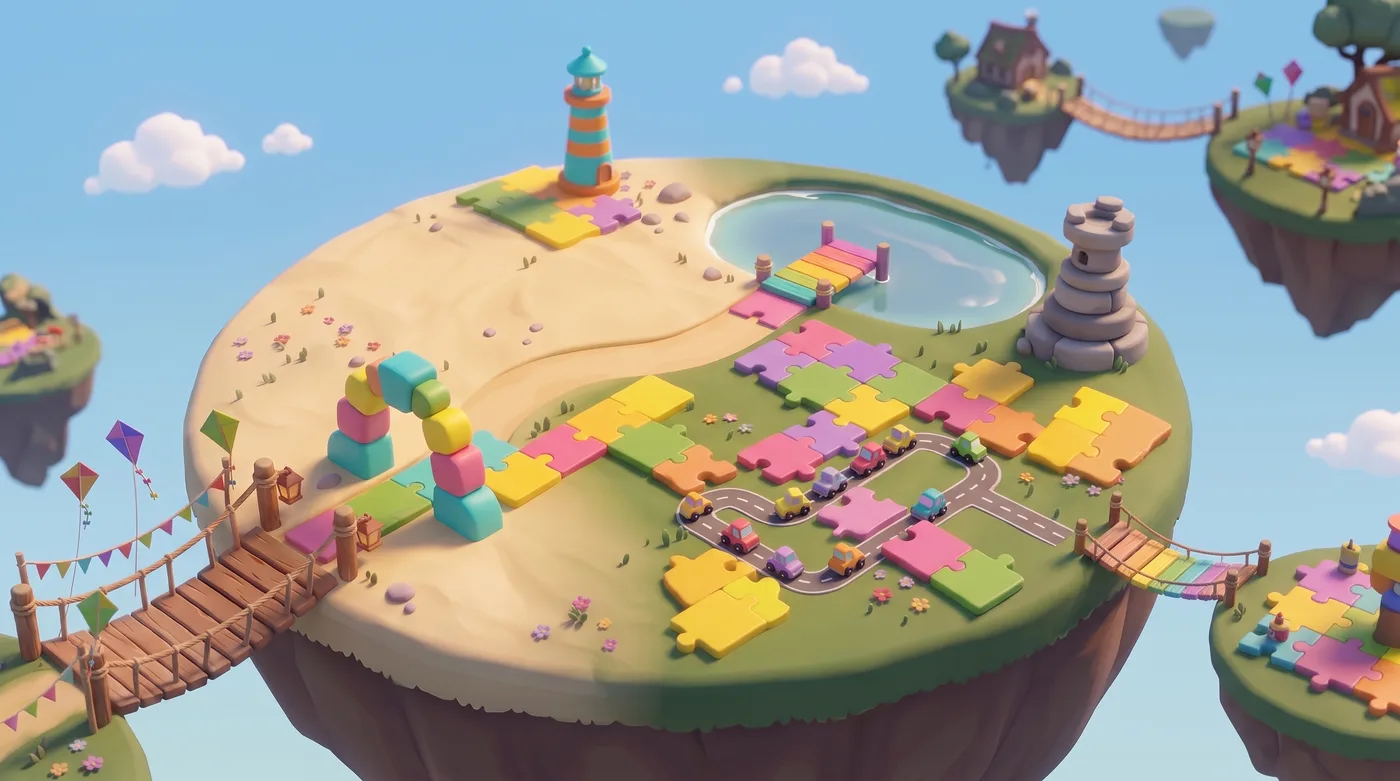
🧩 Puzzle Park
Logic puzzles to work out: picture grids, island bridges, traffic jams, code breaking, shape puzzles and a temple tower. Careful practice runs open new corners.
- 🧩Puzzles to think about.
- 🐢Practise without rushing. New puzzles open.
- ⭐Win stars.
- Tap 🧩 Puzzle Park in More on your home page.
- Pick a corner and a level. Starter is the easiest, Master the hardest.
- Work it out step by step. Stuck? Tap Show me a step: it shows the next move and why it works.
- Win up to 3 stars. In Traffic Jam and Candi Tower, use as few moves as you can. In Code Breaker, crack the code on your first try.
- Corners open with careful practice runs: Picture Grid after 1, Island Bridges after 3, Traffic Jam after 6, Code Breaker after 10, Shape Fit after 15, Candi Tower after 20, Number Cages after 25, Tower View after 30, Lighthouse after 35, Cross Sums after 40, Last Stone after 45 and Star Field after 50. Right or wrong, a careful run counts.
- An open corner never closes. Puzzle Park gives stars, not points.
- During a lesson your teacher can pause Puzzle Park for a while. It opens again by itself, and your puzzles and stars stay safe.
- Your puzzles and stars stay on this device.
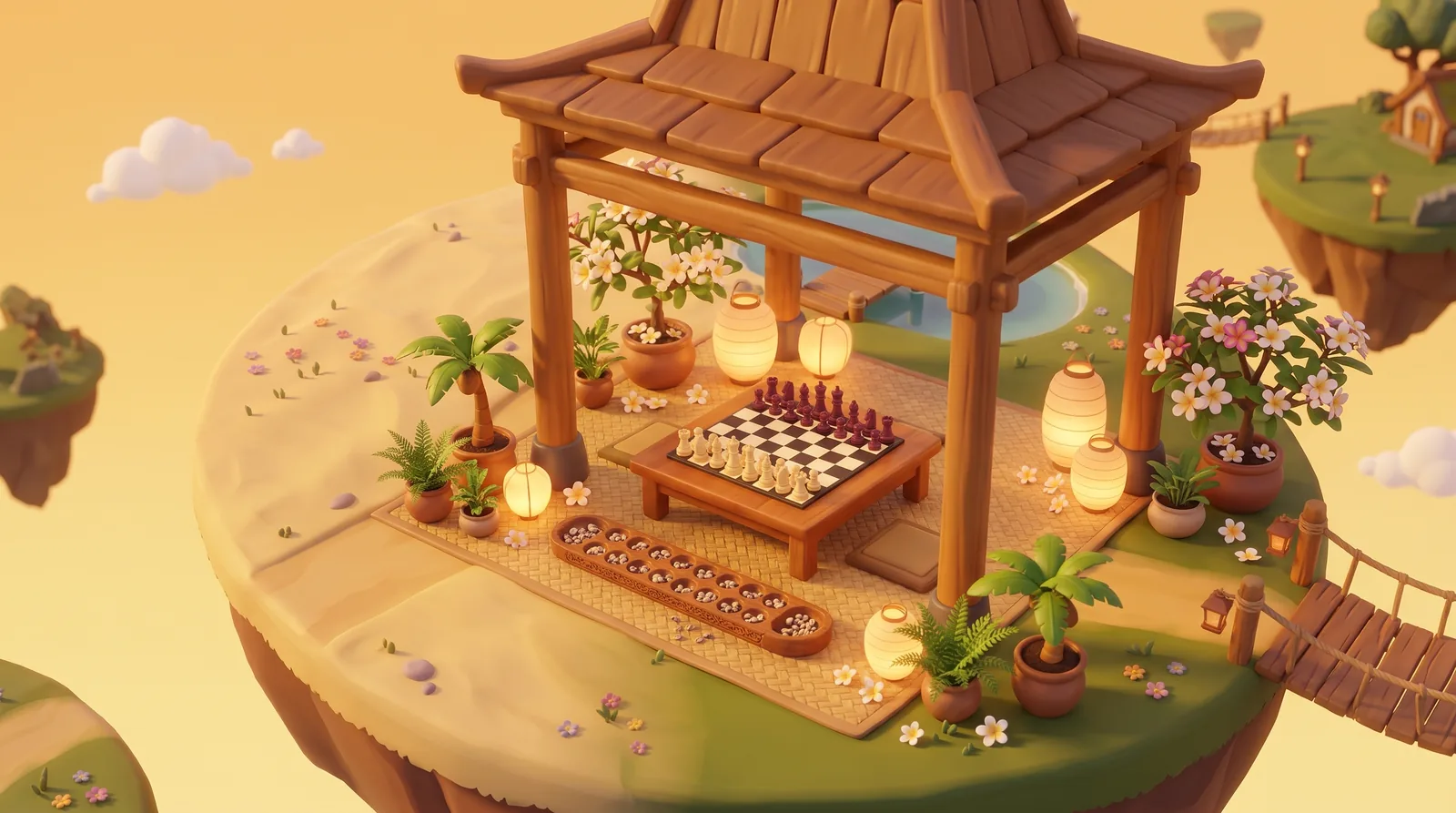
🎲 After-School Clubs
Play Chess and Congklak, move by move, with a classmate or a friend from your school. You can also practise with Kancil, or play a friend on the same device.
- ♟Chess and Congklak.
- 🦌Play Kancil.
- 👫Or play a friend on this screen.
- Tap 🎲 Clubs in More on your home page. Pick the Chess Club or the Congklak Club.
- Invite a friend from My class or My school. A green dot means they are in Clubs now.
- Or open a table for your class or your school. The first friend who sits down plays you.
- Tap a piece or a hole to move. In Chess the dots show every move a piece can make.
- You only play students of your own school. You can send a friendly reaction like "Good move!", but there is no chat.
- An invite or an open table waits 20 minutes. A game with a friend has no clock, so it can go on for days.
- School league: every game you finish with a friend scores in this month’s table for your grades (4-6, 7-9 or 10-12): 4 points for a win, 2 for a draw, 1 for every other finished game. A game counts from 10 moves in Chess or 6 in Congklak, and 2 a day with the same friend. A new table starts on the 1st of every month.
- Playing with classmates by name opens in Grade 4. Kancil and a friend on this device are ready whenever Clubs is open.
- Clubs is open after school: 14:30 to 22:00 on school days, and 06:00 to 22:00 on weekends and holidays.
- League points are only for the Clubs tables. Games never change your Sparkuna points, levels or school marks.
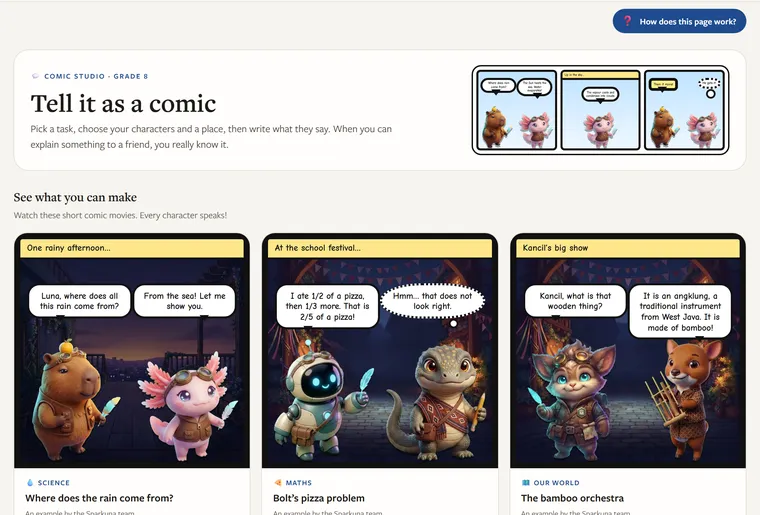
💬 Comic Studio
Make a short comic where two companions talk about something you learned. Write what they say, watch it as a movie with voices, and share it with your school.
- 🦊Pick a story and two friends.
- ✏️Write what they say.
- 🎬Watch it as a movie!
- Tap 💬 Comic Studio in More on your home page. Watch an example first if you like.
- Pick a task. It tells you what the characters talk about and gives you useful words.
- Tap a panel. Choose a place and the characters, then write what each one says, thinks or shouts.
- Tick every box in the checklist. Then tap ▶ Play as a movie.
- Tap 🔗 Share with my school to get a link for your friends and your teacher.
- The checklist looks for capital letters, full stops, the key words of the task and kind words. It helps you; it is not a mark.
- Your comics are saved on this device. You can print them, too.
- Only people from your school who sign in to Sparkuna, and your teachers, can open a shared comic. Your teacher can take a comic down.
- Comic Studio does not give points. It is for writing and explaining.
🎪 Events
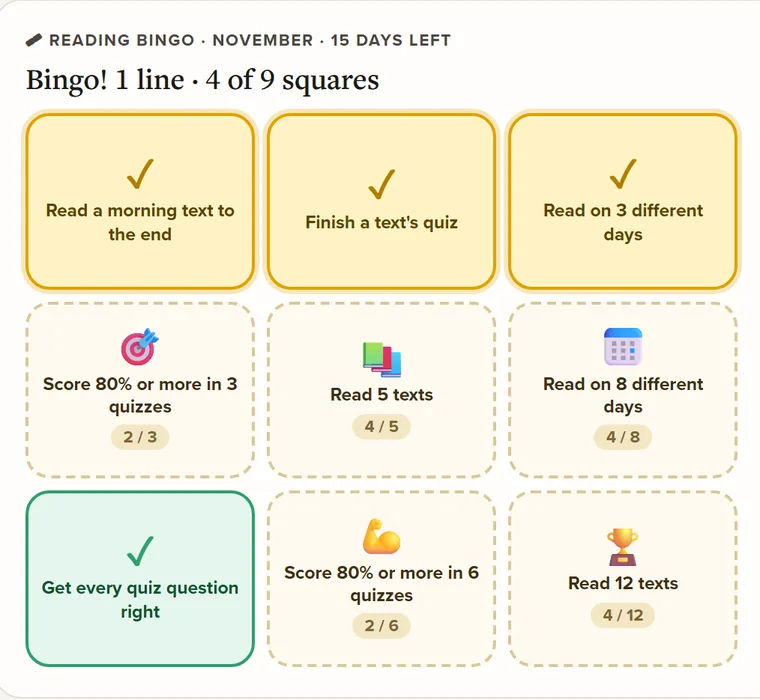
Something is always on: a challenge every week, a Reading Bingo card every month and, from Grade 3, a Comic Contest every two weeks. Join in for event stamps.
- 🎪Look for Happening now on your home page.
- 📖Read books to fill your Bingo card.
- 🎟️Get a stamp for your Trophy Room!
- On your home page, look for 🎪 Happening now. Tap a card, or tap All events.
- This week's challenge changes every Monday: a puzzle, a discovery on Wisdom Isle, Word Cards on 3 different days, a simulation, or 2 Clubs games with friends.
- 🧠 Problem of the Week: one problem for your grade, a hint if you need it and 3 tries. Solve it to see the worked solution and a question to talk about.
- 🏆 Comic Contest: make a comic for the contest's task in Comic Studio, tick every box, then tap Enter the contest.
- 📖 Reading Bingo: read and take the quizzes in Reading. The squares tick themselves. Three in a row is a Bingo line.
- No points to win or lose, and nobody is ranked. Each event you join gives you an event stamp for the Events badges in your Trophy Room.
- The answer to the Problem of the Week is never shown before you solve it or the week ends. Last week's problem and its solution are under it.
- Your teacher chooses which comics go in your school's gallery and may give one a ⭐ Teacher's pick. Only your school sees the gallery.
🧩 The top bar
Every page has the same bar at the top. Here is what each part does.
The menu under your picture
❓ Questions students ask
Why didn't I get an island piece?
A run needs 5 or more questions, and you need to take your time on each one. You can get 3 pieces a day. An answer in under 2 seconds, or a run where every answer is "I don't know", does not count. The results screen tells you why a run did not count.
Why did I get fewer points?
Your first 20 runs each day get full points. After that you get fewer. A question you already got right gives no points the next time.
Can I lose points?
No. Your points never go down. Wrong answers, skipped questions and “I don't know this yet” cost nothing.
My streak went back to 1. Why?
You missed a school day with no points (Jakarta time). Saturdays, Sundays and holidays never break a streak. A streak freeze from the daily chest can save your streak for one missed school day.
Does Sparkuna count for my school report?
No. Sparkuna is for learning and fun.
I picked the wrong grade. What can I do?
You cannot change it yourself. Ask your teacher. They can ask Eduversal to change it.
Why is there no Leaderboard for me?
Grades 1 to 3 have no leaderboard. You play for your own stars and points.
Who can see my island?
Schoolmates in your part of the school (Grades 4-6, or Grades 7-12) can visit it. You see how many hearts you got, never who left them. You can close your island to visitors at any time.
Can my family see my work?
Yes, if you make a Family card on your Profile. It shows your effort, never your answers. You can turn it off at any time.
A question looks wrong. What do I do?
Press 🚩 report after you answer. Eduversal checks every report.
Want all the numbers? Read How points work.
Still stuck? Ask your teacher, or tap your picture, then 💬 Tell us what you think.